Every new session with a coding agent starts the same way. It reads the repo, guesses the conventions, and then proposes the approach you rejected two weeks ago. You explain again. The explanation lives in a transcript that the next session will not read.
The usual fix is to make the agent remember more: longer instruction files, saved chat logs, a growing notes folder. That makes the problem worse. The agent now reads more, trusts stale copies, and still misses the one decision that matters.
The better question is not “how do I make it remember?” but “what is worth remembering at all?” Most of what an agent needs can be recomputed from the repo in seconds. Only a small part cannot. This article gives you a method to sort the two, store the small part in plain files, and keep it small. It works with any agent and no extra tools.
Three buckets: persist, recompute, don’t keep
Sort every piece of project knowledge with one test: can the agent get this back, correctly, by looking at the repo right now?
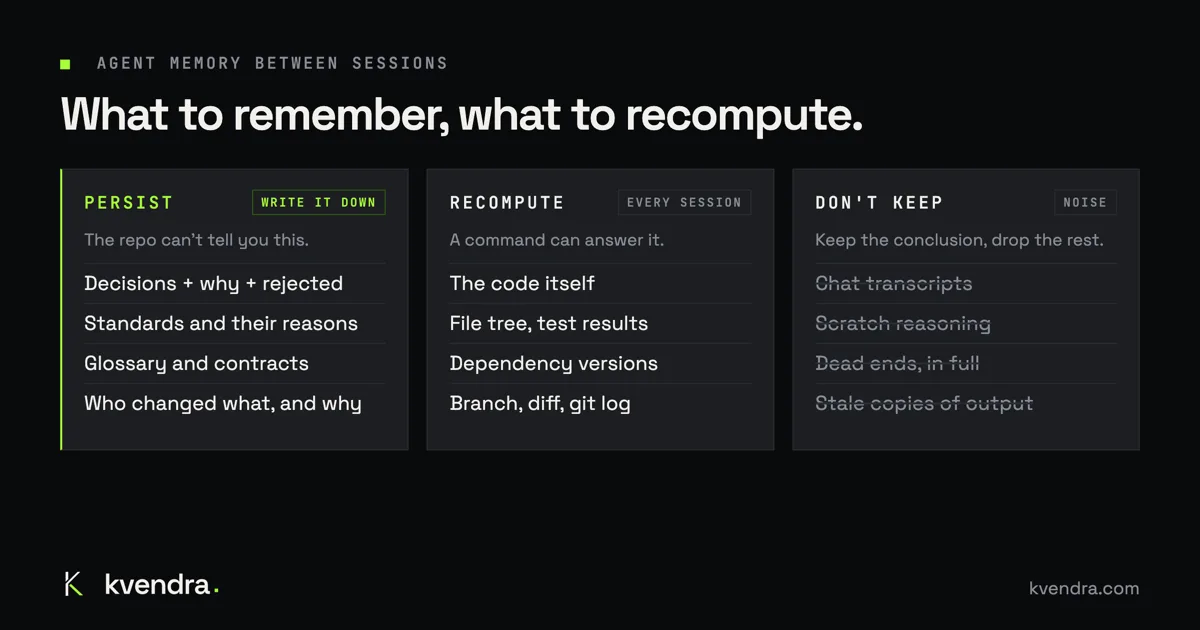
| Persist | Recompute every session | Don’t keep |
|---|---|---|
| Decisions, with the reason and the options you rejected | The code itself | Chat transcripts |
| Standards: how code and tests are written here, and why | The file tree and module layout | Scratch reasoning and dead ends |
| Glossary: what your project’s words mean | Test results and build output | “As discussed above” summaries |
| Contracts: APIs and data shapes other parts depend on | Dependency versions | Copies of files or command output |
| Who changed a decision, when and why | Branch, diff and commit history |
Persist what the repo cannot tell you. The code shows what you built. It does not show why you chose session cookies over JWT, that you tried a queue and dropped it, or that “booking” and “reservation” mean different things in your domain. If that knowledge is lost, the agent will reopen the question, and it will often pick the option you already rejected.
Recompute anything a command can answer. File trees, test status, installed versions and the current diff change all the time. A copy written down last Tuesday is worse than no copy: the agent trusts it, and it is wrong. Let the agent run git log, ls, the test suite or the lockfile every session. That is cheap, and it is always current.
Don’t keep the transcript. A session log holds everything that was said, in the order it was said: the wrong turns, the half-ideas, the “wait, no”. The next session needs the conclusion, not the conversation. Before you close a session, turn the conclusion into a record. Then let the transcript go.
A dead end is the one exception, and only in short form. “We tried a Redis queue; it doubled the ops work for no gain at our volume” is worth keeping. It belongs in the decision as a rejected option, in one line, not as forty messages of debugging.
How to store what you persist, in plain files
You do not need a database to start. A small folder and a few rules will take a single developer a long way.
One file per decision
Keep decisions in docs/decisions/, one short file each, numbered:
# 0012 Auth: session cookies

Status: active (supersedes 0007)
Date: 2026-11-03

Decision: the web app authenticates with HTTP-only session cookies.
Why: the API and the web app share one domain, and cookies keep the token out of JavaScript.
Rejected: JWT in localStorage (readable by any injected script).
Rejected: a separate auth service (too much to run for one app).
Four things make a record useful to an agent: the decision in one sentence, the reason, the options you rejected, and a status. The rejected options matter most. They are what stops the agent from proposing them again.
Standards, glossary and contracts
docs/standards.md: rules the agent must follow, each with its reason. “Tests are named after the rule they check, because a failing test should say which rule broke.”docs/glossary.md: one line per term. Agents use words loosely; your domain does not.- Contracts stay where your tools already read them: an OpenAPI file, a schema, a typed interface. Point to them; do not paraphrase them.
Retire, don’t delete
When you change your mind, write a new decision and mark the old one superseded by 0012. Do not delete it and do not edit it into the new one. The history of a decision is part of its reason: “we used SQLite until the second region” explains a lot of code. Keep an index, docs/decisions/README.md, that lists only the active decisions, so the agent reads the current state first and the history only when it needs it.
Keep the boot file small
CLAUDE.md, AGENTS.md or whatever your agent reads first is a boot file, not a knowledge base. Every line in it is read every session, so every stale line is repeated every session. Cap it. Ours is limited to about 40 lines. It should hold:
# Project boot file

- What this project is, in two lines.
- Read docs/decisions/README.md before proposing an approach.
- Follow docs/standards.md; terms are defined in docs/glossary.md.
- Run tests with: make test
- At the end of a session, record new decisions in docs/decisions/.
- Never edit a decision record; supersede it.
Pointers, not content. If a rule needs a paragraph of explanation, it belongs in a standard, and the boot file links to it.
Close each session with a distillation
The last step of a session is the one people skip. Ask the agent: “What did we decide today, and what did we reject? Write each as a decision record and update the index.” Review the diff like any other change. That habit, more than any tool, is what makes the next session start where this one ended.
Where plain files stop working
This setup holds for one person and one agent. It strains as soon as either number grows.
- Who may change what. In a folder, the agent can edit any file, including the standard that tells it not to. You find out in code review, if you notice. There is no difference between “the agent proposed a new rule” and “the rule changed”.
- What replaced what. Supersession lives in text that someone has to keep in sync. With fifty decisions, the index drifts, two records both say
active, and the agent picks whichever it read last. - Why a record changed. Git tells you who touched the file and when. The why is only there if every commit message says it, and agent commits rarely do.
- Many sessions, many agents. Two sessions that record decisions at the same time collide in the same files. Add a second developer, or agents working in parallel, and you get merge conflicts in your project’s memory.
- Finding the right record. The agent loads the index, then greps. Past a few dozen records it either reads too much or misses the relevant one.
None of this means the method is wrong. It means the method needs a store that understands records, status and history, instead of files that only pretend to.
How we do it in Kvendra
We built Kvendra because we hit every one of those limits on our own projects. The method is the same; the store is different.
The decisions, standards and reasons behind your project live in a knowledge base that your agent reads and writes across sessions. A decision is a record with its reason and the options it rejected, not a paragraph in a file. When you change your mind, you replace a decision with a new one and its reason; the old one is marked superseded and kept in the history, and a new session builds on the new one.
Every change is traceable: who, when, which version and why. So “who changed this standard, and why?” has an answer, whether it was you or the agent.
The boot file stays small. Onboarding a project writes a short CLAUDE.md that tells your agent to load the project from the knowledge base at the start of every session. Ours stays at about 40 lines while the project behind it has grown for months.
The split between buckets holds too. The code stays in git; the knowledge about the code goes into the knowledge base. Sessions start from the decisions, not from the last transcript. It works where you already code: a plugin for Claude Code.
If you want to see it before you install anything, the first module of Kvendra Academy records decisions, supersedes one, adds standards and fixes a glossary and an API contract on a sample project, one short lesson each. You can also explore a live, read-only demo at app.kvendra.cloud/demo.
Start with the method
You can apply the three buckets today with a folder and a ten-line boot file. When the folder starts to fight you, try the same method on a knowledge base built for it.